Python – parallelizing CPU-bound tasks with multiprocessing
January 16th, 2012 at 7:51 pmIn a previous post on Python threads, I briefly mentioned that threads are unsuitable for CPU-bound tasks, and multiprocessing should be used instead. Here I want to demonstrate this with benchmark numbers, also showing that creating multiple processes in Python is just as simple as creating multiple threads.
First, let’s pick a simple computation to use for the benchmarking. I don’t want it to be completely artificial, so I’ll use a dumbed-down version of factorization – breaking a number to its prime factors. Here is a very naive and un-optimized function that takes a number and returns a list of factors:
def factorize_naive(n):
""" A naive factorization method. Take integer 'n', return list of
factors.
"""
if n < 2:
return []
factors = []
p = 2
while True:
if n == 1:
return factors
r = n % p
if r == 0:
factors.append(p)
n = n / p
elif p * p >= n:
factors.append(n)
return factors
elif p > 2:
# Advance in steps of 2 over odd numbers
p += 2
else:
# If p == 2, get to 3
p += 1
assert False, "unreachable"
Now, as the base for benchmarking, I’ll be using the following serial (single-thread) factorizer that takes a list of numbers to factorize, and returns a dict mapping a number to its list of factors:
def serial_factorizer(nums):
return {n: factorize_naive(n) for n in nums}
The threaded version follows. It also takes a list of numbers to factorize, as well as the amount of threads to create. It then divides the list into chunks and assigns each chunk to a separate thread:
def threaded_factorizer(nums, nthreads):
def worker(nums, outdict):
""" The worker function, invoked in a thread. 'nums' is a
list of numbers to factor. The results are placed in
outdict.
"""
for n in nums:
outdict[n] = factorize_naive(n)
# Each thread will get 'chunksize' nums and its own output dict
chunksize = int(math.ceil(len(nums) / float(nthreads)))
threads = []
outs = [{} for i in range(nthreads)]
for i in range(nthreads):
# Create each thread, passing it its chunk of numbers to factor
# and output dict.
t = threading.Thread(
target=worker,
args=(nums[chunksize * i:chunksize * (i + 1)],
outs[i]))
threads.append(t)
t.start()
# Wait for all threads to finish
for t in threads:
t.join()
# Merge all partial output dicts into a single dict and return it
return {k: v for out_d in outs for k, v in out_d.iteritems()}
Note that the interface between the main and worker threads is very simple. Each worker thread has some amount of work to do, after which it simply returns. Thus the only thing the main thread does is fire up nthreads threads with suitable arguments and then waits for them to finish.
I ran a benchmark of the serial vs. threaded factorizer with 2, 4 and 8 threads. The benchmark was to factorize a constant set of large numbers, to minimize differences due to random chance. All the tests were run on my Ubuntu 10.04 laptop with a Intel Core i7-2820MQ CPU (4 physical cores, hyper-threaded).
Here are the results:
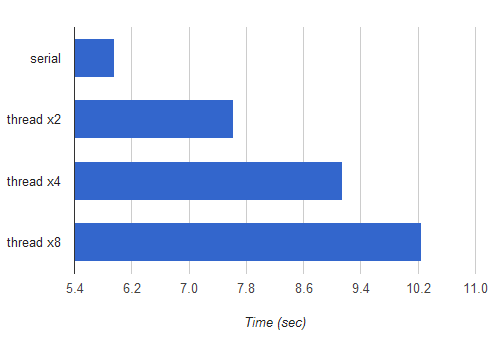
The horizontal axis is time in seconds, hence shorter bars mean faster execution. Yes, splitting the computation to several threads is actually slower than the serial implementation, and the more threads are used, the slower it gets.
This may be a bit surprising if you’re not familiar with the way Python threads are implemented and the GIL (Global Interpreter Lock). To understand why this is happening, you can hardly do better than read Dave Beazley’s articles and presentations on this topic. His work is so comprehensive and accessible that I see absolutely no point repeating any of it (except the conclusions) here.
Let’s now do the same, just with processes instead of threads. Python’s excellent multiprocessing module makes processes as simple to launch and manage as threads. In fact, it provides very similar APIs to the threading module. Here’s multi-process factorizer:
def mp_factorizer(nums, nprocs):
def worker(nums, out_q):
""" The worker function, invoked in a process. 'nums' is a
list of numbers to factor. The results are placed in
a dictionary that's pushed to a queue.
"""
outdict = {}
for n in nums:
outdict[n] = factorize_naive(n)
out_q.put(outdict)
# Each process will get 'chunksize' nums and a queue to put his out
# dict into
out_q = Queue()
chunksize = int(math.ceil(len(nums) / float(nprocs)))
procs = []
for i in range(nprocs):
p = multiprocessing.Process(
target=worker,
args=(nums[chunksize * i:chunksize * (i + 1)],
out_q))
procs.append(p)
p.start()
# Collect all results into a single result dict. We know how many dicts
# with results to expect.
resultdict = {}
for i in range(nprocs):
resultdict.update(out_q.get())
# Wait for all worker processes to finish
for p in procs:
p.join()
return resultdict
The only real difference here vs. the thread solution is the way output is passed back from the worker to the main thread/process. With multiprocessing, we can’t simply pass a dict to the sub-process and expect its modifications to be visible in another process. There are several approaches to solve this problem. One is use a synchronized dictionary from multiprocessing.managers.SyncManager. The one I’ve chosen is to simply create a Queue, and let each worker process put a result dictionary into it. mp_factorizer can then collect all results into a single dictionary and then join the processes (note that as mentioned in the multiprocessing documentation, join should be called after all results in a Queue the process was writing into were consumed).
I’ve run the same benchmark, adding the runtimes from mp_factorizer to the chart:
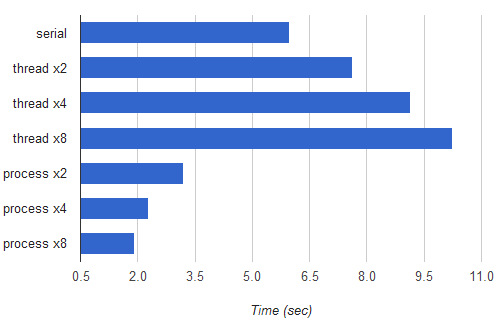
As you can see, there are nice speedups. The fastest multi-process version (split to 8 processes) runs 3.1 times as fast as the serial version. Although my CPU only has 4 physical cores (and the pair of hardware "threads" in each core share a lot of execution resources), the 8-process version runs faster, which is probably due to the fact that the OS doesn’t allocate the CPUs optimally between "heavy" tasks. Another reason for the speedup being a bit far from 4x is that the work isn’t evenly divided between sub-processes. Some numbers are dramatically faster to factorize than others, and currently no attention is being paid to load-balancing the tasks between the workers.
These are interesting topics to explore, but way beyond the scope of this post. For our needs the best advice is to run benchmarks and decide on the best parallellization strategy according to the results.
The goal of this post was two-fold. One, to provide an easy demonstration of how Python threads are bad for speeding up CPU-bound computations (they’re actually pretty good for slowing them down!), while multiprocessing does use the multi-core CPU in a parallel manner, as expected. Two, to show that multiprocessing makes writing parallel code as easy as using threading. There’s a bit more work to be done when synchronizing objects between processes than between threads, but otherwise it’s very similar code. And if you ask me, that object synchronization is more difficult is a good thing, because the less objects are shared the better. This is the main reason why multi-process programming is often considered safer and less bug-prone than multi-threaded programming.
Related posts:

January 17th, 2012 at 12:47
Nice write-up. As a follow up, I don’t suppose you’d have time to look at the same basic idea with concurrent.futures?
January 17th, 2012 at 13:58
Nick,
Nice, I didn’t consider looking into
concurrent.futures. I’m not sure my example translated to it would be much more interesting than the example given in the docs, though. I also wouldn’t expect any performance differences, given thatconcurrent.futuresis based onmultiprocessingfor the process executor.January 17th, 2012 at 14:53
I would like to recommend a book on this topic: The Art of Concurrency: A Thread Monkey’s Guide to Writing Parallel Applications (http://goo.gl/ydGyV [amazon.com]). I read that book to better understand at what point do things need to become concurrent, and how best to make them concurrent given both static and dynamic seed data to one or more steps in an algorithm.
Scaling an application can be difficult. Most of the time concurrency isn’t needed unless things are _realy_ slow or that it doesn’t meet your business service level agreement. In those cases, locating the slow areas with various tools… and then finding out where you can decompose in a scalable way… and then if you needed to scale it either by adding more concurrent lines of execution or even by making the application distributed then which way would be best… you begin to see how scaling an appication is more of an art than a formula.
I hope that helps.
January 17th, 2012 at 18:25
I wrote a blog post about this and called it the “python effective core count” – comparing different python implementations. Currently Jython and IronPython are the only pythons that gain performance by threading. You can see the specifics at http://uberpython.wordpress.com/2011/08/09/the-gil-detector/
January 17th, 2012 at 20:42
when rewritten in c++ this program runs so much faster than the 4 processes benchmark even though it was serial
January 17th, 2012 at 20:49
kevin,
You’re almost certainly right, but the intention here was not to time Python vs. C++ (or any other language, really).
January 18th, 2012 at 05:17
I was looking at some multiprocessing stuff this weekend in Python, and came across this interesting approach, using ZeroMQ to communicate between the control process and the workers:
http://taotetek.wordpress.com/2011/02/02/python-multiprocessing-with-zeromq/
Whilst you’ll have additional overhead from zeromq if you approach this from a single machine perspective, it does make it comparatively trivial to make this scale on a network basis.
January 18th, 2012 at 06:58
Twirrim,
Yep, I read that article – it’s pretty good. I plan to write about scaling onto multiple machines with
multiprocessingin the future. ZeroMQ is a nice approach for that.January 19th, 2012 at 17:53
Hi! I am interested quite a while in multi-threading, especially with high-level-languages like Python. So I was glad to read your articles about it. I am really surprised but confirm that multiple processes can outperform the same number of Python threads!
I repeated your benchmarks factorizing 10000 numbers in [1e9,2e9] with Ubuntu 11.04 on a Single(!)-Core Pentium-M 2GHz (each line is a minimum of 10 measurements):
serial_factorizer(): 3666.7 msthreaded_factorizer(1): 3682.9 ms
threaded_factorizer(2): 3707.6 ms
threaded_factorizer(4): 3785.8 ms
threaded_factorizer(8): 3809.0 ms
mp_factorizer(1): 3705.2 ms
mp_factorizer(2): 3710.7 ms
mp_factorizer(4): 3721.3 ms
mp_factorizer(8): 3743.8 ms
* Expected result (for Single-Core-CPUs!): less processes are faster.
* Surprising result: n processes are indeed faster than n threads!
* Further result: any overhead I see is much smaller than yours – only around 0.4% per thread and even less per process.
I interpret the surprising result as a victory of the Linux process scheduler over the Python thread scheduler or GIL. Would be interesting to challenge another OS!
IMO multi-threading/-processing can be used to implement certain solutions very naturally and elegant (e.g. Actors vs Objects) or simply to speed-up an implementation on multi-core systems. For the latter any portable(!) code should first check (at runtime or before) how many threads or processes are most beneficial.
January 19th, 2012 at 20:14
I wrote a very similar post about parallelizing matrix multiplication instead of factorization a few months ago.
http://bpgergo.blogspot.com/2011/08/matrix-multiplication-in-python.html
January 19th, 2012 at 20:54
Oliver,
Do read Dave Beazley’s presentations. He specifically addresses why the performance of multiple threads fighting for GIL deteriorates on multi-core machines, while it’s reasonable for a single-core machine.
bpgergo,
Interesting. Thanks for the link.
January 28th, 2012 at 23:58
Hi Eli,
Great article, I really enjoyed reading it, but I thought I’d point out one mistake in your multiprocessing code. In the example code you call
join()on all of processes you’ve created before getting the data out of the queues. According to the multiprocessing docs (see excerpt below) this could cause a deadlock and they suggest callingget()on all the queue objects before callingjoin()on the process objects since the processes will not terminate until the data has been retrieved from their queues.I ran into this problem myself when running your code above—oddly enough, the
mp_factorizer()function worked if I used 6 or more processes, but deadlocked otherwise. Switching the ordering of thejoin()andget()methods fixed that issue for me.Just thought I’d share this with you in case any of your readers run into the same issue.
Thanks for the article, I really enjoyed reading it and I’m enjoying this entire series you have running now on Python and concurrency.
January 29th, 2012 at 08:03
Christopher,
Thanks for noticing! I must have missed that warning in the documentation, and since I ran into no real problems with it (no deadlocks in multiple runs with parallelization factors of 2, 4, 8), and since it was similar to the threads code, I called
joinbefore getting results.I’ve updated the code sample now with code that should work correctly.
January 29th, 2012 at 16:50
For the record, under 3.2, the threaded version is ~4% slower than the serial version (on a quad-core i5).
January 29th, 2012 at 20:58
Antoine,
Yep, thanks to your new GIL implementation! Well done there
Dave Beazley covers it in one of the presentations on the page I linked to.
May 8th, 2012 at 04:42
I am new to python , and am slightly confused by the code for multiprocessing. You said that you create an output queue for each of your process but to me it seems like you just create a shared out_q , that you pass as argument to all the processes and then collect the result from the same shared queue .
Could you please give more details on what is shared output queue for all processes and a queue for each processes.
I am confused about :
for i in range(nprocs):
resultdict.update(out_q.get())
how does this piece of code can collect results from queue from different processes unless it is a shared queue between every process.
May 8th, 2012 at 05:01
prateek,
No, I just create a single
Queueand pass it around to all sub-processes. See this quote from the article:May 8th, 2012 at 05:28
http://python.dzone.com/articles/parallelizing-cpu-bound-tasks
Could you correct this information on this website. I was confused because i read your article here and assumed you created one queue per process.
Also does this implies that if I create a shared queue per process (which is shared between the process itself and the producer/feeder thread) and put the task on these per process shared queues and finally collect results from them , i can get even better speedup due to lesser contention as compared to one shared queue
Thanks for your prompt reply
May 8th, 2012 at 07:39
prateek,
Not sure what you want me to fix. Anyhow, I’m not responsible to keep the DZone mirror updated.
I think I tried having a separate Q for each sub-process, but it didn’t matter in terms of performance so I just went with a single Q for simplicity. You can run your own benchmark to compare the two approaches.
September 21st, 2012 at 08:28
Nice guide to multiprocessing and comparison with threading. Thank you.
October 12th, 2012 at 09:56
Thank you for this. Please allow me to comment on the modifications necessary to run under WIndows XP:
1. The worker function must be picklable, so move it outside the mp_factorizer to the top level of the module
2. The module will be imported by the parent proceses, so the code calling mp_factorizer must be guarded inside if __name == ‘__main__’:
3. The multiprocessing Queue implementation should be used, so out_q = Queue() should be replaced by out_q = multiprocessing.Queue()
January 14th, 2013 at 07:10
Thanks for the guide. Thanks also to Neonakis, couldn’t have gotten it to work quickly on windows without his additions.
February 7th, 2013 at 17:07
E.A. Neonakis -> Unfortunately, I beat my head against this last snippet of code for about 2 hours before I found your comment. without
multiprocessing.pre-pending theQueue()creation, the Queue was not being shared between processes. I could see the values being put in the queue in theworker()threads but the (what turned out to be separate) queue would remain empty from themp_factorizer()context.May 9th, 2013 at 01:21
For a year I follow with interest the project ” Supercomputing for Everyone “:
http://www.parallella.org/
The member of the community are either Developing Support for Python and others language!
I googled the words ” Python and parallel processing ” and I stumbled upon your site.
I just tested your algorithm on my PC (windows 7 with I7 processor and python 2.7)
With the proposed changes from E.A.Neonakis, the program works perfectly.
I verified the proper operation of the parallelization with the task manager in Windows, and miracle, the work is perfectly balanced between the 8 units of the processor.
With the processing algorithm in series only one unit works!
For 2 million numbers:
Algorithm series: 22 seconds
Parallel algorithm: 9.2 seconds
Conclusion: your algorithm works perfectly.
Congratulations for your article and your work.
And urges the arrival of the electronic board of the firm Parrallella (only $ 100)!