matplotlib with PyQt GUIs
January 20th, 2009 at 10:00 pmA few months ago I posted a couple of demo snippets for embedding matplotlib plots into wxPython GUIs.
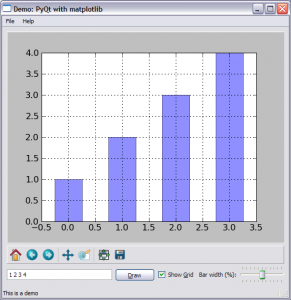
Well, as I’m now in the process of moving to PyQt for my GUI needs in Python, I’ve reimplemented one of the demos with PyQt. Here’s a screenshot:
And the demo itself can be taken from here.
The demo features:
- Using the maplotlib navigation toolbar
- Adding data to the plot dynamically
- Dynamically modifying the plot’s properties
- Processing matplotlib events in the GUI
- Saving the plot to a file from a menu
The embedding of matplotlib into PyQt is relatively smooth and similar to wxPython, with a couple of tiny differences (which mainly have to do with how the two frameworks handle parenting of GUI elements). Note that I’ve reimplemented only one of the demos, but it’s really sufficient for getting started with combining the two libraries.
Related posts:


March 13th, 2009 at 15:58
That’s cool
However, I’m missing on key feature for my application:
I need to plot a image with a pyqt application. That is no pb AFAICS.
The problem is that I need to be able to click on the image to get the corresponding pixel value ((X,Y) and the value).
A display “x=, y=” within the matplotlib backend is not sufficient.
I need to be able to use these values into my pyqt code.
For instance, each time I click on the image, I show the pixel value within a qlineedit.
Is it even possible? If not, I’m in trouble with pylab+pyqt.
March 13th, 2009 at 17:06
For that I doubt you need matplotlib. Qt has excellent support for showing images, for example with something like QGraphicsView. I’m not sure this is exactly the class you need, but it’s probably not very far from the truth.
March 15th, 2009 at 00:56
It is true that QGraphicsView could do the job when I only want to plot an image.
However, I do need matplotlib because I need all the plotting capabilities of matplotlib (latex, alpha, shapes overplot). OK ok I can do that within the
QGraphicsView framework but I would prefer not to redevelop part of matplotlib in qt4
The only thing I’m missing is a link to get the (x,y,pixel) values under the mouse into my python code.
If it is not possible at all, then I’m going to use QGraphicsView to display images and matplotlib to display functions and scatter plot. I would be the backup solution…but I would lose the nice and easier_to_use subplot capabilities of matplotlib (mixing images and scatter plot for instance).
Do you see a chance to get this link?
March 15th, 2009 at 01:05
Wait wait wait…I’m a dumbass.
I haven’t seen matplotlib.backend_bases.PickEvent … I’m pretty sure that is what I need…
March 27th, 2009 at 01:21
Unfortunately, there is a bug
:
If you zoom on the image using the standard zoom button of the matplotlib toolbar, then the axes go back to there “nominal” state each time the on_draw even is called (e.g. each time you cover/uncover the window).
I’m not sure how it should be fixed…the on_draw even should only redraw a precomputed image…but I have no idea how the code should looks like so far.
April 16th, 2009 at 03:52
I enjoyed your example but I had to make a small change for the matplotlib API’s that are present on Kubuntu 8.04:
#box_points = event.artist.get_bbox().get_points()
box_points = event.artist.get_verts()
msg = “You’ve clicked on a bar with coords:\n %s” % str(box_points)
My API for matplotlib.patches.Rectangle has no get_bbox().
cheers!
June 6th, 2009 at 04:27
Cool – Just the example I was looking for
September 2nd, 2009 at 22:04
Thank you very much for the matplotlib-pyqt interface code. Very helpful
October 8th, 2009 at 10:33
You example doesn’t seem to run with matplotlib 0.99.1.1 and pyqt 4.6 and leads to a segmentation fault. The problem seems to come from the NavigationToolBar (if I comment the 2 lines concerning the NavigationToolBar it’s OK). I guess, this problem comes from the qt4agg backend of matplotlib which has not been updated to the new pyqt4.6 version.
December 15th, 2009 at 19:06
Is it possible to extend the mouse interaction to the axis labels, for instance to pop up some resource browser to edit range, number of decimal points, etc. The current mouse picks seem to only work on the actual bars in the plot area. Any hints please?
December 16th, 2009 at 06:16
@Ian, it could be possible by exploring the event types
mpl_connectaccepts. Here‘s a sample documentation link on the subject.May 20th, 2010 at 21:22
Tondu – I find that:
will give you the toolbar back.
… and thanks to Eli for this outline of how to embed matplotlib into pyqt.
–Paul
June 14th, 2010 at 14:13
thanks so much, very helpful for integrating matplotlib, would have taken ages without an appropriate demo.
October 5th, 2011 at 16:26
How can I print the plot using QPrinter ?
October 5th, 2011 at 17:04
Nils,
Unfortunately I have absolutely no experience working with
QPrinterand printing in Qt in general. Hopefully someone else will be able to help you. IIRCmatplotlibhas capabilities to export its plots to images and other format – maybe this can be the path.October 5th, 2011 at 17:13
Eli,
matplotlib provides http://matplotlib.sourceforge.net/api/pyplot_api.html#matplotlib.pyplot.savefig
How do I proceed if I have stored the plot ?
October 5th, 2011 at 22:18
Nils,
Well, then I guess you can load the image and paint it onto
QPrintersince it’s aQPaintDevice. Searching through the examples that come with PyQt there are a lot of hits onQPrinter, so you may find some useful stuff there.October 8th, 2011 at 18:48
Very useful example.
Thank you very much for your effort
October 26th, 2011 at 10:46
Thanks! This is incredibly useful.
December 27th, 2011 at 07:43
Hello,
First of all, amazing tutorial! However, I am trying to get the figure to dynamically resize to fit its QWidget container.
Any suggestions??
Tyler
January 19th, 2012 at 10:17
I added a printer button to the navigation toolbar in matplotlib.
However the quality of the print-out is poor using QPrinter.
Moreover the frame including the navigation toolbar is printed.
How can I omit that ?
How can I improve the quality of the hardcopy ? If I save the figure before, the print-out of the image is o.k.
Can anybody offer any solutions to this ?
import sysimport numpy as np
from PyQt4.QtCore import *
from PyQt4.QtGui import *
#from xlwt import *
from pylab import plot, show
from matplotlib.figure import Figure
from matplotlib.backends.backend_qt4agg import FigureCanvasQTAgg as FigureCanvas
from matplotlib.backends.backend_qt4agg import NavigationToolbar2QT as NavigationToolbar2
class ViewWidget(QMainWindow):
def __init__(self):
QMainWindow.__init__(self)
# create a simple main widget to keep the figure
self.mainWidget = QWidget()
self.setCentralWidget(self.mainWidget)
layout = QVBoxLayout()
self.mainWidget.setLayout(layout)
# create a figure
self.figure_canvas = FigureCanvas(Figure())
layout.addWidget(self.figure_canvas, 10)
# and the axes for the figure
self.axes = self.figure_canvas.figure.add_subplot(111)
x = np.linspace(0.,2*np.pi,100)
self.axes.plot(x,np.sin(x),label='sin(x) ')
self.axes.plot(x,np.cos(x),label='cos(x) ')
self.axes.figure.set_facecolor('white')
self.axes.grid('on')
self.axes.legend()
# add a navigation toolbar
self.navigation_toolbar = NavigationToolbar2(self.figure_canvas, self)
layout.addWidget(self.navigation_toolbar, 0)
self.print_button = QPushButton()
self.print_button.setIcon(QIcon("Fileprint.png"))
self.print_button.setToolTip("Print the figure")
self.navigation_toolbar.addWidget(self.print_button)
self.connect(self.print_button, SIGNAL('clicked()'), self.goPrinter)
self.quit_button = QPushButton("&Quit")
self.navigation_toolbar.addWidget(self.quit_button)
self.connect(self.quit_button, SIGNAL('clicked()'), self.close)
def goPrinter(self):
printer = QPrinter()
anotherWidget= QPrintDialog(printer,self)
if(anotherWidget.exec_() != QDialog.Accepted):
return
p = QPixmap.grabWidget(self)
printLabel = QLabel()
printLabel.setPixmap(p)
painter = QPainter(printer)
printLabel.render(painter)
painter.end()
show()
if __name__=="__main__":
app=QApplication(sys.argv)
mw=ViewWidget()
mw.show()
sys.exit(app.exec_())
January 20th, 2012 at 15:54
Eli,
here comes the corrected version
http://pastebin.com/vR0X5DQc
February 29th, 2012 at 12:10
I tried to combine an event with annotation.
However, the annotation is not visible, when I click on the curves.
How can I resolve the problem ?
The code is available at http://pastebin.com/QxKBZtaX
Any pointer would be appreciated.
February 29th, 2012 at 13:04
Nils,
I no longer support this code. Sorry. I suggest you take specific questions elsewhere like StackOverflow or the PyQt/matplotlib forums/mailing lists.
March 12th, 2012 at 19:20
Hi
I get a segmentation fault when I try to save the file. Can you guide me on what the problem could be.
May 14th, 2012 at 13:14
Thank you so much! This saved me so much time of figuring out the right API calls to make
September 27th, 2012 at 10:53
Great work Eli and thanks for making it available to the Python community
One simple question --- which would you choose for building a GUI, wxPython or PyQt?Any comments positive or negative on wxPython and PyQt would be greatly appreciated.
September 27th, 2012 at 15:11
@Virgil,
I suggest you do a search on my site for PyQt – I’ve written a bit about the reasons for switching to it from wxPython a long while ago.