Tetris implemented in PyQt
December 12th, 2009 at 4:10 pmA while ago, to learn wxPython, I’ve written wxPytris. Since then, I’ve switched to PyQt for my Python GUI coding and don’t even bother to install wxPython on my machines any more.
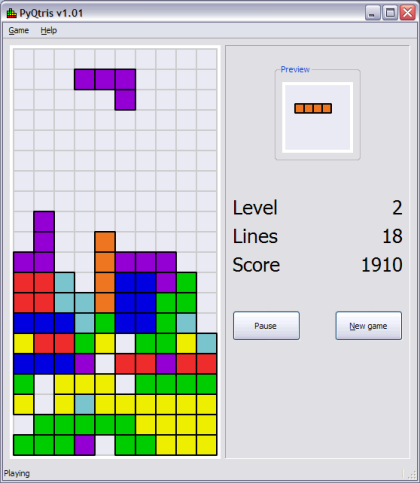
Therefore, I’ve rewritten the tetris game with PyQt. PyQtris is the name of the new game (am I original or what?). It’s an exact clone appearance-wise, and works with the same high-scores file, so it can be just plugged in for wxPytris.
Here’s the mandatory screenshot:

The porting process was easy, although a bit boring. Most of the GUI code maps 1-to-1 between wxPython and PyQt, and there are only some quirks to be handled differently. The built-in double-buffering of widgets in Qt4 helps make it a cleaner code in the drawing part.
Get the source code here. You can run it with Python 2.6 and the latest PyQt. If you’re on Windows, you can also download this 6MB executable that has no dependencies whatsoever (created with PyInstaller).
Related posts:

December 15th, 2009 at 21:12
Nice idea! I should dig up my old tetris clone and play with it. Mine is in Java; maybe I’ll change it so it’s written entirely in Jython.
April 5th, 2010 at 14:32
Hello,
I’m new to PyQt and I’m trying to choose the right toolkit for my applications.
Is it normal that the executable pyqtris.exe (PyQt) loads 20 times slower than the executable wxpytris.exe (wxPython)? (almost 20 seconds with respect to less than 1 second on my machine, Intel Core 2, 2 processors at 2 GHz, Windows Vista 32bit).
Thank you.
April 5th, 2010 at 15:25
@Francesco,
No – it isn’t normal. On my computer (Core Duo with Win XP) PyQtris loads in 3-4 seconds.
April 5th, 2010 at 18:46
Thanks for your reply Eli,
there should be something wrong with PyQt/Qt and Vista.
I tried not only your executables but also the source code of tetris and
these other two applications:
http://eli.thegreenplace.net/2009/01/20/matplotlib-with-pyqt-guis/
http://eli.thegreenplace.net/2009/05/23/more-pyqt-plotting-demos/
Launching these softwares from the interpreter takes no more than one or two seconds. But unfortunately when I close them, python.exe crashes.
(I tried both the precompiled version of PyQt and to compile PyQt by myself)
In our lab we want to move from Visual Basic (5!) to Python + PyQt but after these first experiences we are not sure anymore
I will ask for help to the PyQt community.
April 6th, 2010 at 05:10
@Francesco,
Try building some Python executables yourself (using PyInstaller) on the machine on which you try executing them – maybe it will make some difference.