A Tetris clone in Python / wxPython

May 31st, 2008 at 12:18 pm

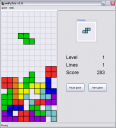
As a part of my quest to learn Python, I decided to fulfill an old dream(*) and implement a Tetris clone, using the excellent wxPython toolkit. While rudimentary, it is a complete Tetris game you can play from beginning to end, with a sophisticated scoring system and a high-scores table.

Here’s a screenshot (you can see the full version by clicking on it):
wxPyTris screenshot

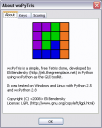
And this is the About box, with some more information:
wxPyTris About dialog

The game is downloadable from here. It’s a source-only distribution, so you’ll need Python 2.5 and wxPython 2.8 installed to run it.

Update 06.06.2008: I’ve uploaded a Windows executable (4.8 MB) of the game. It was created with py2exe and doesn’t require installing anything in order to run.

The code is about 1 KLOC, divided into several files (Python’s zip-import ability is used, so most of the code is in the lib.zip file). It is my first non-trivial Python program, so the code is probably far from being beautiful idiomatic Python, although I’m sure it’s not bad.

(*) Back when I started programming, I really wanted to write a Tetris. At that time (1998) I wrote graphical programs using Borland’s conio library, drawing on the DOS screen. After implementing a Snake clone, I felt ready for Tetris but got quickly stuck. I recall having a problem with the rotation code - I couldn’t figure out how to rotate the blocks.

Later as I gained programming experience I realized that it’s simple, but I didn’t have the opportunity to get back to Tetris. Indeed, as it turned out, the rotation code is one of the simplest parts of the game. Most of my time was spent reading the wxPython manuals and getting all the GUI widgets to line-up nicely :-)

6 Responses to “A Tetris clone in Python / wxPython”

  1. ripper234 Says:

    Very nice (just the screenshots, I don’t think I’ll download python + wxPython just to play). I think we all played around with Snake at the time :)

    My experience was taking the QBasic code and modifying it to the extreme.

  2. eliben Says:

    Actually, my snake was in Borland C++. I recall the QuickBasic example, but somehow I’ve never connected to Basic and its kin so I didn’t play with it too much.

    I’m enough of a hoarder to have kept all those old programs, by the way. My “snake” clone is called Worm, written circa May 1999. It’s OO C++ (!!)
    Now, if I could just make it run… (it uses Borland’s old graphics libs I can’t find)

  3. Vasudev Ram Says:

    Sounds cool.

    For the graphics libs, try googling for sites that archive old software - by using appropriate keywords. Then search on those sites for the libs. Might get it.

    - Vasudev Ram
    www.dancingbison.com

  4. Ned Batchelder Says:

    Very nice. If the pieces rotated counterclockwise, it would be perfect! Luckily I could easily change a boolean to make it so. :)

    I noticed the Mandelbrot in your header. You might want to take a look at Aptus.

  5. Michael Says:

    Looks nice!
    Looked into the code, and somehow felt a strong smell of C++ :)

  6. Sam Dutton Says:

    Works really well — cheers!

Leave a Reply